

Live view · demo data
A look inside the AI product roadmap.
This AI product roadmap is the page I open first every working day as a product owner. Claude builds it from the places where product work actually happens: the issue tracker, the wiki, the team chat, stand-up notes, email, GitHub and the analytics tools. It turns all of that into one page that anyone in the company can read in two minutes.
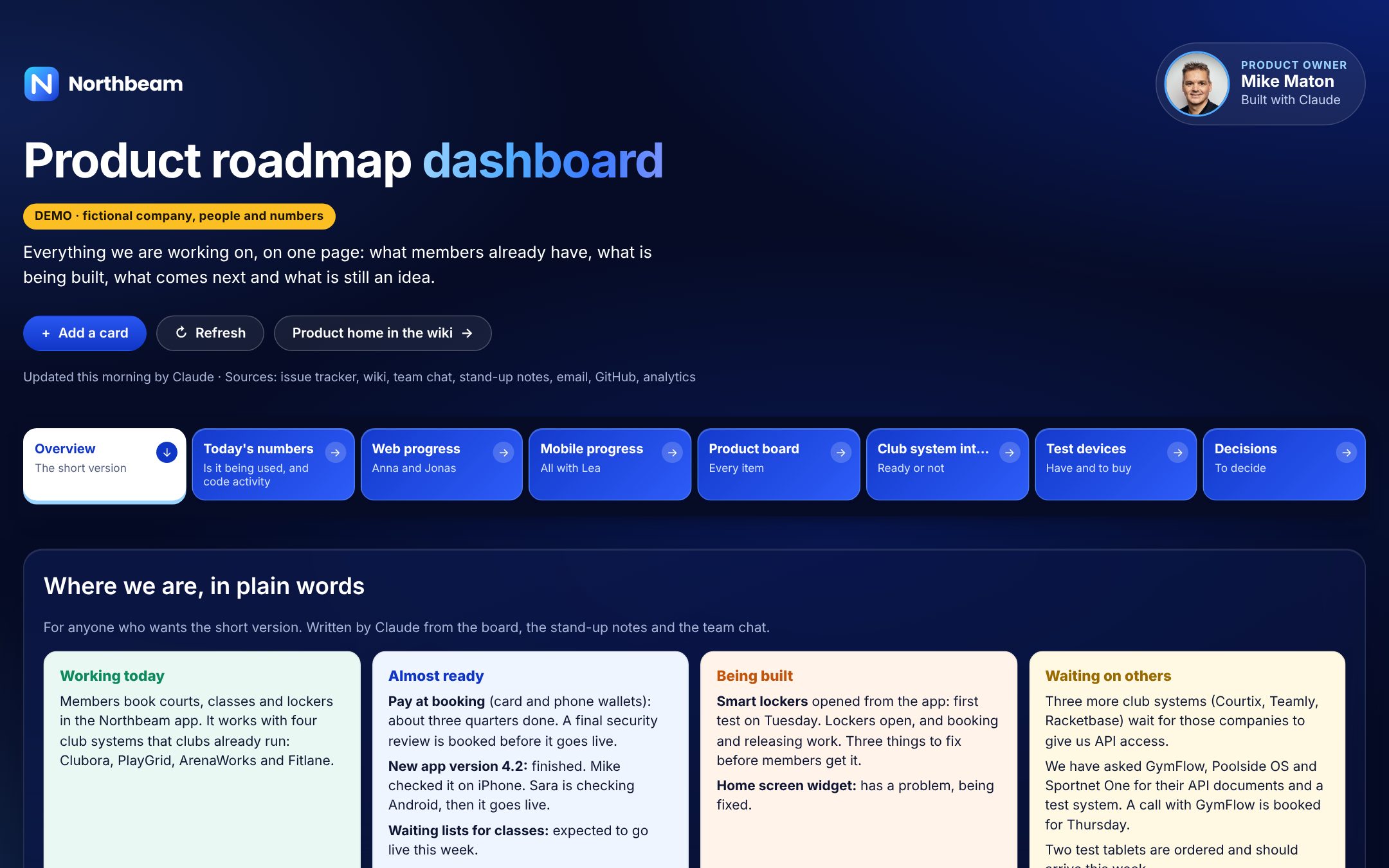
The top of the dashboard: who owns it, when Claude last updated it, where the data comes from, and eight tabs that each answer one question.
Eight tabs, eight questions
Click through the AI product roadmap, tab by tab.
Each tab answers a question people ask a product owner every week. Pick a tab to see the screen and what that part of the AI product roadmap is for.
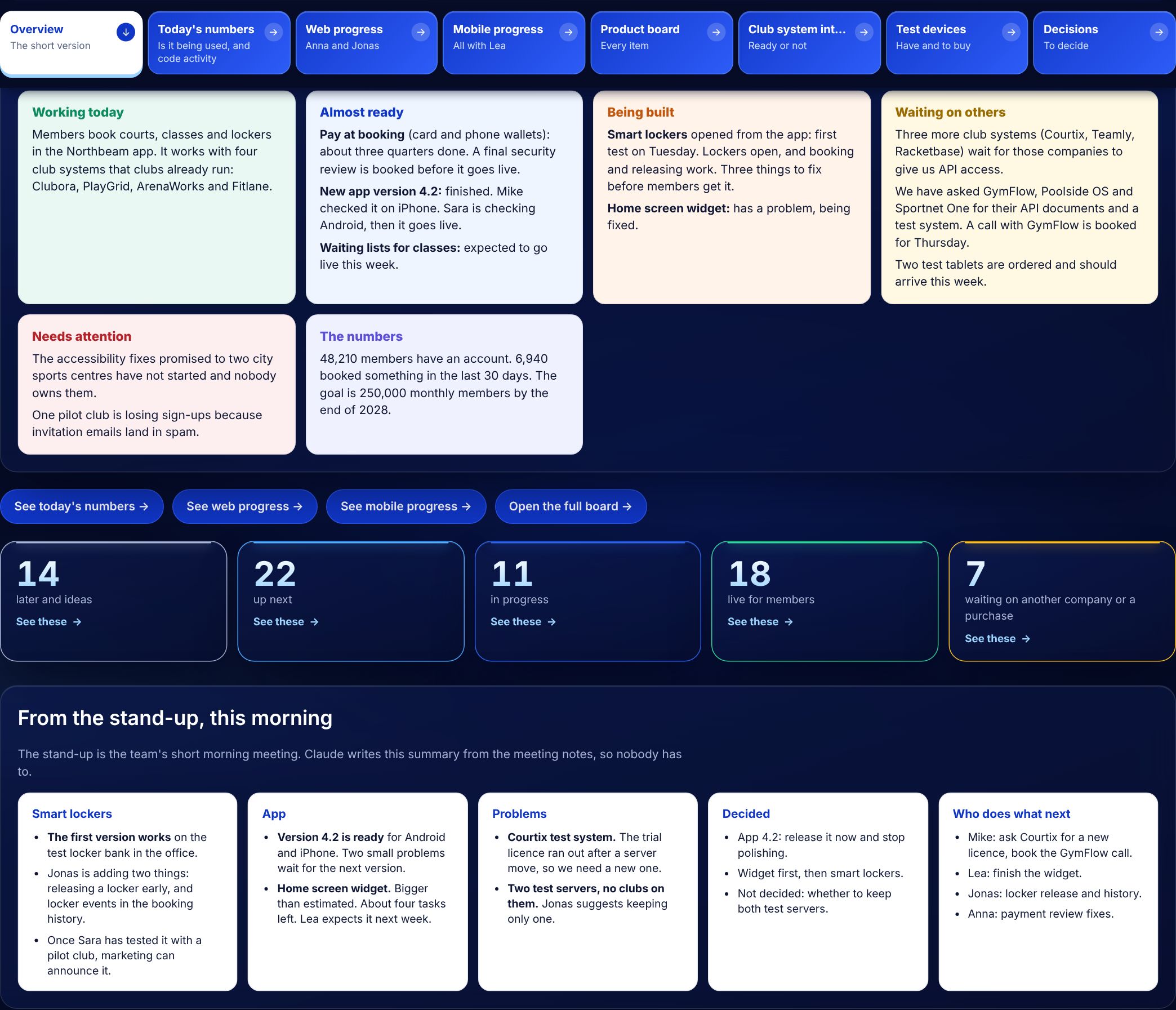
Overview: the short version
Where everything stands, in plain words. Working today, almost ready, being built, waiting on others and needs attention, followed by the stage counts and a summary of this morning's stand-up.
- Written for the CEO, sales and support, not only developers
- Stand-up notes summarised by Claude
- Counts link straight to the board
How it works
Seven sources in, one roadmap out.
A product roadmap usually goes stale because keeping it current is a job nobody has time for. In this AI product roadmap that job is done by Claude, the AI model made by Anthropic. Every morning it reads the sources below and rewrites the page. I review it, correct anything that is off, and the team gets one version of the truth.
- Issue tracker (Jira)
- Wiki (Confluence)
- Team chat (Slack)
- Stand-up notes
- Email threads with partners
- GitHub
- Product analytics
Read
Claude pulls tickets, epics, wiki pages, chat threads and partner emails from the last day.
Sort
Every item lands in one of four stages: later and ideas, up next, in progress, live.
Measure
Progress bars are counted from real tasks, not guessed. Usage and code activity come from the tools themselves.
Flag
Gaps a product owner would chase: no owner, no spec, design not confirmed, waiting on a partner.
Write
A plain-words summary on top, decisions for the week at the end. I check it before it goes out.
What is on the page
What each part of the AI product roadmap does.
The short version
Status in plain words, stage counts and the latest stand-up summary. Built for people who will never open Jira.
Is it being used?
Weekly usage chart, key figures and code activity per person, with Claude's notes on what to read carefully.
How far along
A progress bar per feature, split into live, finished, in progress and not started, plus roadmap health and workload by area.
Focus check
Are the agreed priorities really getting the time? Effort split by task, what is blocking each focus and suggested next steps.
Every item
A kanban board with filters for area, priority, stage and owner. Cards can be added by typing or by voice.
Partner pipeline
Every partner system from API docs to live, and who was contacted, when, and what happens next.
Have and to buy
Test hardware the team needs, who orders it, how urgent it is, and what is already on someone's desk.
To decide
The decisions the leadership meeting has to make this week, and which features still have no written spec.
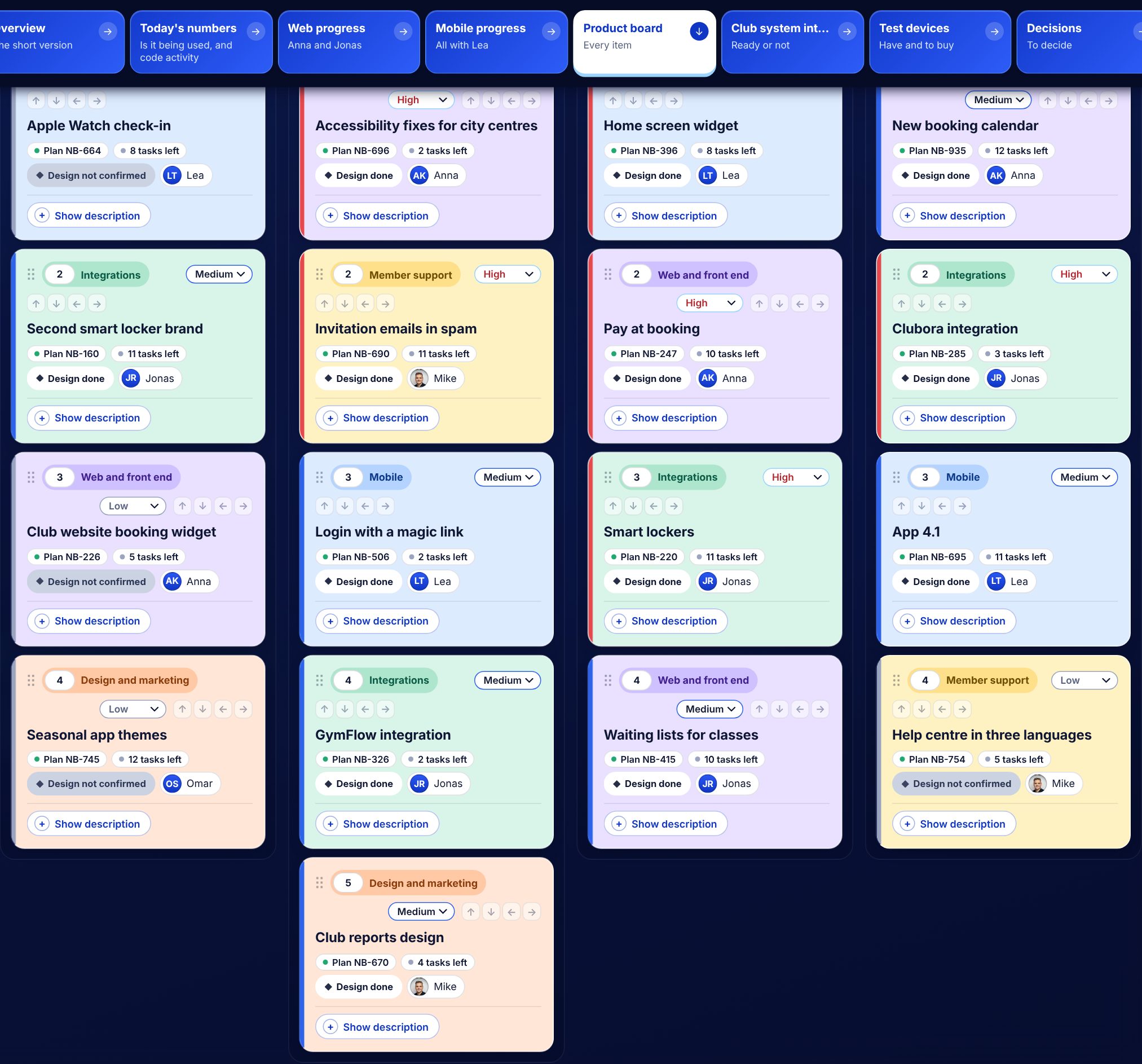
The product board
A kanban board that keeps itself tidy.
Every card carries the same facts: area, priority, plan in the tracker, tasks left, design status and owner. Claude fills them in from the tracker, so the board never drifts away from what the developers actually see.
- Drag cards, or use the arrow buttons, to reorder
- Filter by area, priority, stage or person
- Add a card by voice: say it, and it lands in the right column
- Click a face to see one person's work only
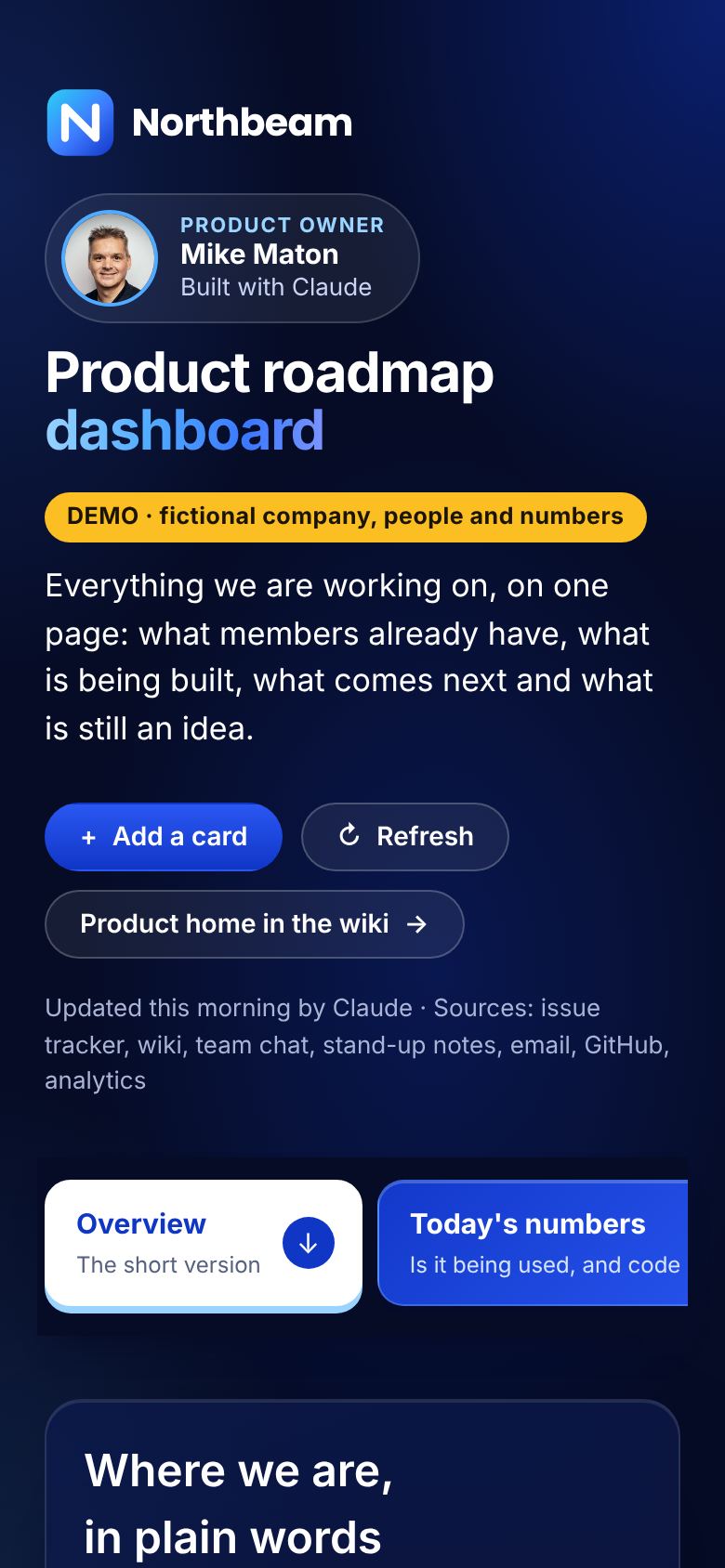
On any screen
Readable on a phone, between meetings.
The roadmap is one web page. It works on a laptop in a planning session and on a phone in a corridor. The tabs scroll sideways, the tables scroll inside their cards, and the plain-words summary stays at the top.
Because it is a page and not a slide deck, there is nothing to export or email. People open the link and always see this morning's version.
Why build it
What changed after I started using an AI product roadmap.
Before the AI product roadmap, the roadmap lived in four places and was out of date in all of them. Updating it took an afternoon a week, so it was updated once a month. Now the update happens before I start work, and my time goes on the decisions instead of the copying.
| Classic roadmap | AI product roadmap | |
|---|---|---|
| Kept up to date | By hand, when someone has time | Every morning by Claude, checked by me |
| Where the facts come from | Memory and status meetings | Tracker, wiki, chat, email, GitHub, analytics |
| Who can read it | People who know the tools | Everyone: there is a plain-words summary |
| Risks | Found in the next meeting | Flagged on the page: no owner, no spec, blocked |
| Format | Slides or a spreadsheet | One live web page with tabs |
How I build it
How to build an AI product roadmap with Claude.
You do not need a data team for this. I built the dashboard in Claude, as a single web page, and I keep improving it in plain English. The steps are the same for any product team.
Connect
Give Claude read access to the tracker, wiki, chat and email through connectors.
Agree the stages
Decide what “up next”, “in progress” and “live” mean for your team, and write it down once.
Design the tabs
One tab per question your CEO, sales and developers ask you. Start with three.
Schedule it
Run the refresh as a scheduled task before the working day starts.
Review
Read it, fix what is wrong, and tell Claude why. The next morning it gets it right.
Two rules matter most. Numbers are counted from the tools, never estimated. And anything a person did not write down, the dashboard says it does not know, instead of guessing.
Under the hood
What the AI product roadmap is built with.
The dashboard is a single web page that Claude writes and updates. There is no server to maintain and no database to design. The parts are simple on purpose, so the page can change as fast as the product does.
One HTML page
Tabs, charts, progress bars and the board are plain HTML, CSS and a little JavaScript. It loads fast and prints cleanly.
Connectors
Claude reads the tracker, wiki, chat, email and GitHub through connectors that only have read access.
A scheduled task
A morning task tells Claude what to read and which parts of the page to rewrite. It takes a few minutes.
A person
I read every update before the team relies on it. Corrections go back to Claude as plain instructions.
Cards added on the board, priorities and the order of cards are saved with the page, so the whole team sees the same board. Charts are drawn in the page itself, with a table under each one for anyone who prefers numbers to lines.
A normal morning
A working day that starts with the AI product roadmap.
This is how the AI product roadmap fits into a normal day. Nothing here needs a meeting to happen first.
07:30
The scheduled task runs. Claude reads yesterday's tickets, chat threads, partner emails and commits, and rewrites the page.
08:15
I read the overview with my coffee. Anything that looks wrong gets a one-line correction, and Claude updates the page.
09:00
Stand-up. The team looks at the board instead of reading status out loud, so the meeting is about problems, not updates.
10:00
Claude adds the stand-up summary: what was decided, what is blocked and who does what next.
Any time
Sales, support or the CEO open the link when a customer asks “when is it coming?” and answer it themselves.
Who it is for
One page, four kinds of reader.
A roadmap that only developers can read is half a roadmap. The AI product roadmap is written so that each group finds its answer without asking the product owner.
The CEO and board
The overview and the decisions tab: what is live, what is late and what they need to decide this week.
Sales and partners
What customers can buy today, what is almost ready and which partner integrations are coming, so nobody promises a date that does not exist.
Customer support
Which problems are known, who is fixing them and when the fix is expected, in words they can repeat to a customer.
The product team
The board, the progress bars and the focus check. Priorities are written down once, so there is no doubt about what comes first.
Lessons
What I learned building an AI product roadmap.
- Plain words beat jargon. The first version used ticket names and status codes. Nobody outside the team read it. Rewriting every status as a short sentence changed that overnight.
- Count, do not estimate. A progress bar is only trusted if it is counted from real tasks. When the tracker has no tasks for a piece of work, the page says so instead of inventing a percentage.
- Show the source and the date. Every figure says where it came from and when it was read. That one line stops most arguments about numbers.
- Let the AI flag, let people decide. Claude points out gaps: no owner, no spec, a very large commit, a partner who has not replied. A person decides what to do about them.
- Grow it one question at a time. Each new tab started as a question someone asked me twice in one week. If nobody asks it, it does not need a tab.
- Keep it private by default. The real dashboard holds names, partners and plans. That is why this page shows a demo with made-up data, and why access to the real one is limited to the team.
Where to start
Your first AI product roadmap in three tabs.
You do not need eight tabs on day one. Most teams get the value from three. Start your AI product roadmap with an overview in plain words, a board with four stages, and a list of decisions for the week. Run it for two weeks and watch which questions people still ask you in chat. Each repeated question is the next tab.
Keep the first AI product roadmap honest. Show where every figure came from and when it was read, and let the page say “not known” when nobody wrote something down. People trust a page that admits gaps far more than one that is always green.
When the three tabs work, add the ones that save you the most time: progress bars counted from the tracker, partner follow-ups from email, or the usage numbers your CEO asks for every Monday. That is how this AI product roadmap grew, and it is the order I would follow again for any product team.
Questions
AI product roadmap: frequently asked questions.
What is an AI product roadmap?
It is a product roadmap that an AI model keeps up to date. Instead of a person copying status from the issue tracker, chat and email into slides, the AI reads those sources and writes one page: what is live, what is being built, what comes next, what is blocked and what needs a decision.
Is this real company data?
No. Everything shown on this page is a demo with a fictional company called Northbeam, made-up people, partners and numbers. The dashboard I use every day has the same layout, but its data is private.
Which tools does it read?
The issue tracker (Jira), the wiki (Confluence), team chat (Slack), stand-up notes, partner emails, GitHub and product analytics. It can work with other tools that Claude can connect to.
Does Claude change anything in Jira or Slack?
No. It reads. Cards added on the dashboard are saved on the dashboard, and I decide what goes back into the tracker.
How long does it take to set up?
A first version with three tabs takes a day. Mine grew to eight tabs over a few weeks, one question at a time.
Is an AI product roadmap better than a tool like Jira Product Discovery or Productboard?
It does a different job. Those tools are where product work is planned. The AI product roadmap sits on top of them and of everything else, chat and email included, and turns it into one readable page. You can use both.
What if the AI gets something wrong?
It happens, usually when a decision was made in a call and never written down. I correct it on the page and tell Claude why. Because every item shows its source, wrong items are quick to spot.
Does it work for a small team?
Yes. It is most useful for teams of three to thirty, where the product owner is also the person everyone asks for status.
Can you build one for my team?
Yes. Tell me which tools your team uses and which questions you are tired of answering, and I will show you what your AI product roadmap could look like.
More AI tools